Introduction
A key concept in information technology (IT) administration is instance management, which is how you manage different versions of your site. This blog post is focused on best practices for Cority EMS, specifically Cority EMS sites that have not been integrated with Cority GX2, and includes the instances that are managed and the tools used to update various instances.
Definitions:
First let’s define some key terms for Cority EMS:
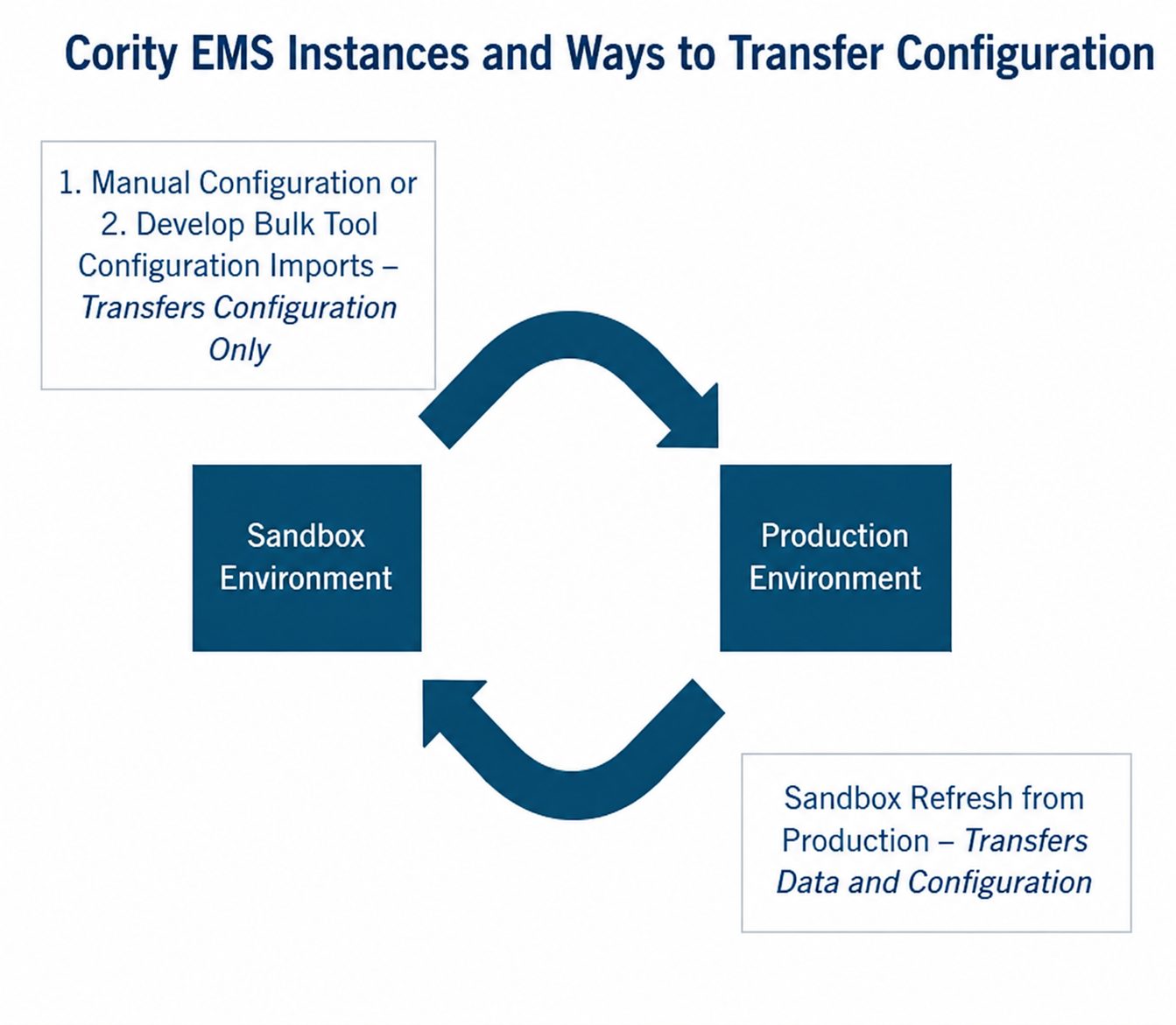
Sandbox instance – An isolated database that is a copy of the production database. Usually used for testing, development, and experimentation without affecting the production database. A sandbox instance allows users to safely test new features before deploying them to the production instance.
Production instance – The live transactional database used for daily operations such as data entry and reporting. Serves as the official data repository for the active application.
Sprint – A set of configuration changes that occur in the same time period.
Bulk tools – Excel-based Cority EMS tools used to update large data sets efficiently. They support copying, moving, deleting, editing requirements, and properties; they also can be used to manage security and permissions.
Refresh – The process used to update the sandbox database with a snapshot of the current production database. This allows the testing and development activities in the sandbox to reflect the latest production data. This must be done by putting a ticket in with the Cority Help Desk.
The below graphic visually demonstrates the instances and methods to update each instance:
Best Practices:
When should Sandbox be refreshed from Production?
Before any major sprints or configuration efforts. For example, before testing integration configuration.
- Confirm no in-progress work in Sandbox will be lost before requesting the refresh of Sandbox from Production.
- Reach out to all parties who could be working in the Sandbox to confirm there is no configuration or testing in progress that will be impacted.
- If there is any in-progress work in Sandbox, create a plan with the team on when that work will be completed and the refresh can be performed.
Process for Refreshing Sandbox
- Have an established process with a responsible person who puts in the refresh ticket with Cority Help Desk.
- Send out an email to all Sandbox users when refresh is complete and the Sandbox instance is available again.
Where to Build a New Configuration?
When building out a brand-new implementation.
- If the change is simple, build calculations directly in Production.
- If the change is complex or a new concept, experiment in Sandbox. Confirm that the change works in Sandbox, then rebuild the calculation change in Production.
- If running a bulk tool, always run in Sandbox first, then run in Production.
Conclusion
Effective instance management can minimize rework and loss of work in progress. Understanding these basic terms and best practices can help Cority EMS administrators make the best decisions for their digital tools. If you are looking for a partner who can help administer or implement digital tools, ALL4 can help with platform implementation and ongoing support. Contact Kurk Hebert at khebert@all4inc.com or Julie Taccino at jtaccino@all4inc.com for more information.